
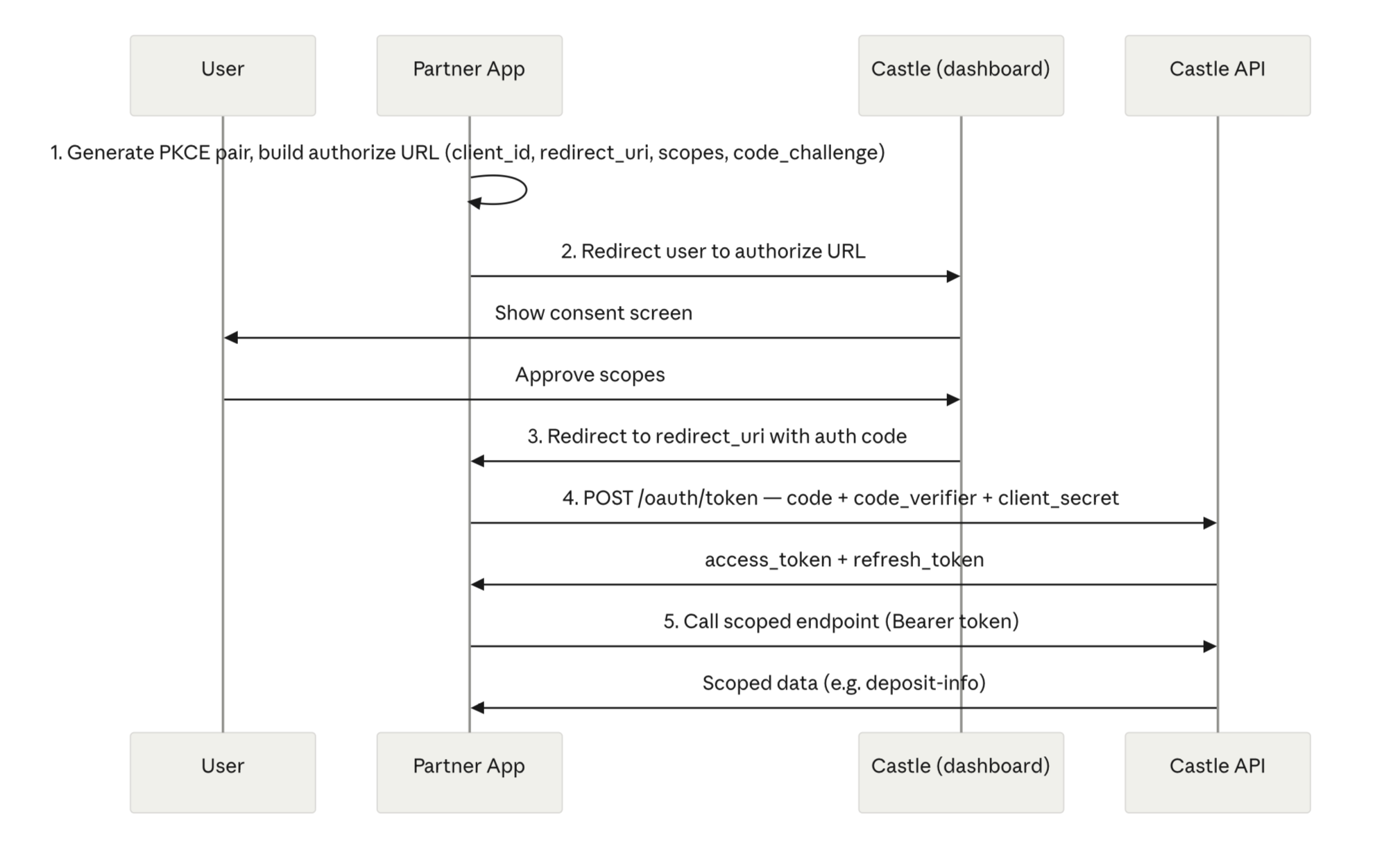
Castle uses the OAuth 2.0 authorization code flow with PKCE. A partner app redirects the user to Castle to approve a set of scopes, receives an authorization code on the registered redirect URI, exchanges that code (plus the PKCE code verifier) for tokens, and then calls scoped Castle API endpoints with the resulting access token.
Endpoints
| Purpose | URL |
|---|---|
| Authorize (consent) | https://dashboard.savewithcastle.com/oauth |
| API base | https://api.savewithcastle.com |
| Token exchange | https://api.savewithcastle.com/oauth/token |
Scopes
Requested as a space-separated list on the authorize URL, e.g.:
cash:account:read cash:address:write| Scope | Grants |
|---|---|
cash:account:read | View the USDC deposit address associated with the account (e.g: to send loan proceeds) |
cash:address:write | Whitelist a USDC address on the account so funds can be sent there (e.g. to pay off a loan) |
PKCE
Castle requires PKCE on the authorization code exchange, using the S256 method:
- Partner generates a
code_verifier— a high-entropy random string (43–128 characters, URL-safe). - Partner derives
code_challenge = BASE64URL(SHA256(code_verifier))and setscode_challenge_method=S256. code_challengeandcode_challenge_methodare sent on the authorize request — noclient_secretrequired for this.- The original
code_verifieris sent on the token exchange request, alongside the authorization code andclient_secret, so Castle can validate the pairing.
Quick generation (Node.js):
const crypto = require('crypto');

const codeVerifier = crypto.randomBytes(32).toString('base64url'); // 43 chars, URL-safe
const codeChallenge = crypto
  .createHash('sha256')
  .update(codeVerifier)
  .digest('base64url');
Quick generation (Python):
import base64, hashlib, secrets

code_verifier = secrets.token_urlsafe(32)
code_challenge = base64.urlsafe_b64encode(
    hashlib.sha256(code_verifier.encode()).digest()
).rstrip(b'=').decode()
Flow
- Configure — Partner generates the PKCE
code_verifier/code_challengepair, then builds the authorize URL usingclient_id,redirect_uri, requested scopes,code_challenge, andcode_challenge_method. - Authorize — Partner redirects the user to that authorize URL to open the Castle consent screen; user reviews and approves the requested scopes.
- Callback — Castle redirects back to the partner's registered
redirect_uriwith an authorization code. - Tokens — Partner exchanges the code (plus the original
code_verifierandclient_secret) for an access token + refresh token viaPOST /oauth/token. The access token expires in 30 days; the refresh token is valid for 1 year and rotates on each use. - API — Partner calls scoped Castle endpoints with
Authorization: Bearer {access_token}, e.g.GET /v1/cash/deposit-infoorPOST /v1/cash/address.
Diagram
Token lifetimes
| Token | Lifetime |
|---|---|
| Access token | 30 days |
| Refresh token | 1 year |
Once the access token expires, use the refresh token to get a new one without re-running the full authorize/consent flow. Refresh tokens rotate on use — each refresh call issues a new refresh token, so the partner should store the latest one and discard the old. Once a refresh token expires (1 year from issuance if unused), the partner needs to send the user back through Authorize/Callback.
Example API calls
Fetch deposit info
GET /v1/cash/deposit-info
Authorization: Bearer {access_token}
Add a cash address
POST /v1/cash/address
Authorization: Bearer {access_token}
Content-Type: application/json

{
  "address": "…",
  "label": "…"
}